Enter any email — and in seconds you’ll know on which websites it’s registered, and sometimes even a partially hidden phone number, all without the email owner knowing.
This is exactly what Holehe does — the most popular tool in cybersecurity communities for beginners.

What is Holehe?
Holehe is an open-source OSINT tool that checks in which websites a specific email is registered — across more than 120 sites in one go.
The method is very clever: the tool doesn’t try to “hack” anything.
It simply uses the “Forgot Password” feature available on every website. If the site replies “This email is registered with us” — Holehe records the result.
The most important part: The tool does not send any notification to the email owner — the process is completely silent.
The project has reached 10,300 stars on GitHub and 1,200 forks — clear proof of its wide popularity in the OSINT community.
Who Is Holehe For?
- Beginners in cybersecurity who want to learn OSINT practically
- Digital investigators who need to map someone’s digital presence
- Anyone who wants to check their own email: Is it leaked? Has it been used in registrations you don’t remember?
- Security teams doing initial reconnaissance before penetration testing
How Does Holehe Work Exactly?
The process is simple yet very smart:
1. You give it an email like test@gmail.com
2. Holehe automatically visits over 120 websites
3. On each site, it triggers the “Forgot Password” feature and enters the email
4. If the site responds “This email exists” — Holehe records the result with ✅
5. At the end, you get a complete report of all websites where this email has an account
Sometimes you also get additional information such as:
- Recovery email (partially hidden):
ex****e@gmail.com - Phone number (partially hidden):
0*******78
Sites Holehe Checks
Among the 120+ sites:
Social Media: Instagram, Twitter, Snapchat, Pinterest, Tumblr, Myspace
Entertainment & Music: Spotify, SoundCloud, Last.fm, Smule
Tech & Programming: GitHub, Discord, Docker, Replit, CodePen, Codecademy
Shopping & Services: Amazon, eBay, Nike, Freelancer, Eventbrite
Productivity: Evernote, HubSpot, Atlassian, Pipedrive, Zoho
And over 100 more sites...
System Requirements
- Python 3.7 or higher
- Internet connection
- Works on: Windows, macOS, Linux
Installation Methods
Method 1: pip (Easiest — One Line)
pip3 install holehe
Method 2: GitHub (For Developers)
git clone https://github.com/megadose/holehe.git cd holehe/ python3 setup.py install
Method 3: Docker
docker build . -t my-holehe-image docker run my-holehe-image holehe test@gmail.com
How to Use It
After installation, the command is very simple:
hholehe example@gmail.com
Replace example@gmail.com with any email you want to check.
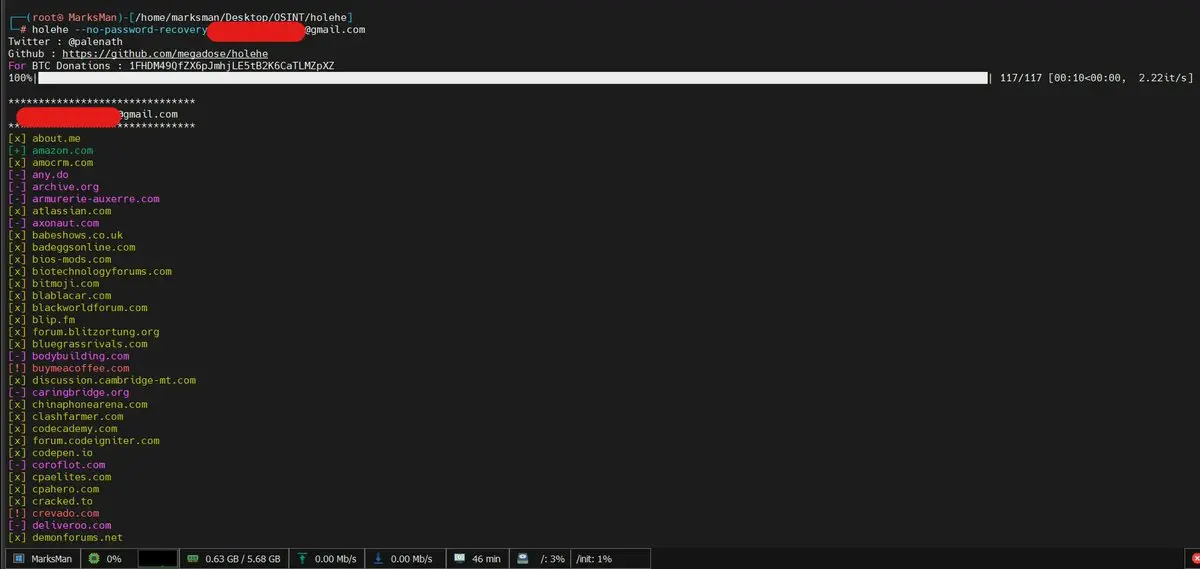
You will get results like:
[+] instagram.com - Account exists [+] spotify.com - Account exists [+] github.com - Account exists [-] facebook.com - Account not found [+] discord.com - Account exists | phone: 0*****78
Tip: If you hit Rate Limit (some sites block repeated requests) — change your IP using a VPN and try again.
Real-World Practical Uses
Checking Your Own Email: What is your real digital footprint? Are there old accounts you forgot about? Checking Data Leaks: If you know your email was in a leaked database, you can check associated websites to secure them. Reconnaissance in Bug Bounty: Gathering initial information about a target you have permission to test. Journalistic Investigation: Mapping the digital presence of a public figure using a known email.
Important Warning — Ethical Use Only
Holehe is designed exclusively for educational and legal purposes:
- Use it only on your own email
- Or on emails you have explicit permission to check
- Or in the context of licensed Bug Bounty or Pentesting tasks
Checking other people’s emails without their permission may be illegal in your country and could expose you to legal liability.
Conclusion
Holehe is the perfect entry point for anyone who wants to learn OSINT in a practical and simple way. 10,300 stars on GitHub prove it is one of the most popular OSINT tools in the world — and one installation line is enough to get you started.
If you are curious about your digital footprint or want to enter the world of cybersecurity through its practical door — Holehe is the right starting point.
Project Link on GitHub: Holehe
Online Version (No Installation): osint.industries
Want to go deeper into OSINT and Dark Web research?
Want to learn about a complete AI-powered ethical hacking system?