How many times have you found an amazing AI tool on GitHub, opened the installation page, seen Python commands, Git requirements, and complex dependencies — then closed the page and gave up?
Pinokio solves this problem completely.
What is Pinokio?
Pinokio is a smart browser designed specifically to install and run open-source AI tools — with one click.
Instead of opening a Terminal and typing commands, or installing Python and Git and dealing with compatibility issues — Pinokio handles all of this under the hood. All you see is an "Install" button, then "Run".
The project has reached 7,300 stars on GitHub — and keeps growing with every new AI tool that appears.
Who is Pinokio For?
- Beginners who want to try local AI tools without dealing with code
- Content creators who want to install image, video, and audio generation tools easily
- Developers who want to quickly try GitHub projects without setting up a development environment
- Anyone who heard about Stable Diffusion or Fooocus or any AI tool but was scared off by complex installation
How Does Pinokio Work?
The idea is simple and brilliant at the same time:
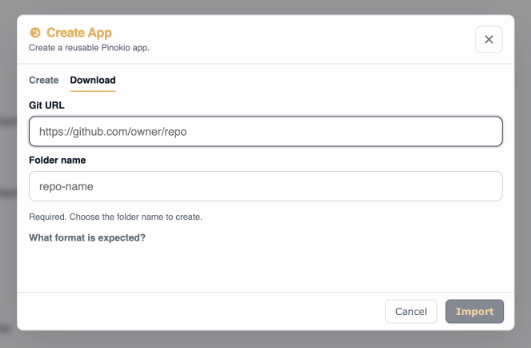
Pinokio contains everything you need inside it — Python, Git, Conda, pip, npm, and other tools — all installed and isolated in one folder on your machine ~/pinokio.
When you press Install on any tool:
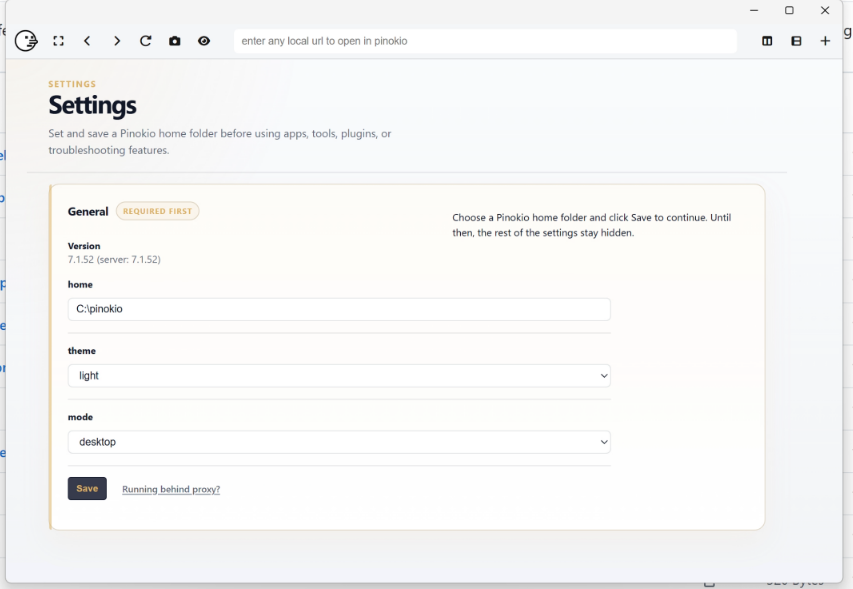
- Pinokio automatically downloads the code from GitHub
- Installs all requirements in an isolated environment
- Runs the tool without affecting any other programs on your device
And when you delete a tool — all its files disappear completely without any leftovers.
Main Features
One-Click Install — Install any AI tool with one click, no Terminal needed.
Fully Isolated Environment — Each tool in its own independent folder, they never conflict with each other.
Discover Page — A curated library of the best AI tools reviewed and approved by the team.
Universal Launcher (new in v7.2.0) — A unified launcher to run any tool, create an app, or run AI tasks.
Tasks (new) — Repeatable, shareable tasks for running AI operations regularly.
Supply Chain Attack Protection — Prevents installing packages published less than 72 hours ago to protect you from new vulnerabilities.
Full support for Windows, macOS, and Linux.
Examples of Tools You Can Install
After installing Pinokio, you can install any of these tools with one click:
Image Generation: Stable Diffusion, Fooocus, ComfyUI, FLUX Audio Generation: WhisperX, RVC, Bark Video Generation: Wan2.1, CogVideoX Chat Models: Ollama, LM Studio, Open WebUI Coding Tools: Aider, Open Interpreter And over a hundred other tools on the Discover page
Installation — Only 3 Steps
Step 1 — Download Pinokio:
Go to the releases page and download the version for your operating system: Pinokio v7.2.0 Releases
For Windows:
Download the .exe file and run it directly
For Mac:
Download the .dmg file (Intel or Apple Silicon)
For Linux:
Download the .AppImage or .deb file depending on your distribution
Step 2 — Open Pinokio: After installation, open the app directly — you'll find a simple welcome page.
Step 3 — Choose a tool and install it: Go to the Discover tab and search for any tool you want — press Install and wait.
That's it. No Terminal, no Python, no problems.
Security — How to Protect Yourself?
Pinokio is designed with security from the ground up:
Isolated programs — Everything inside ~/pinokio, doesn't touch the rest of your system.
Open-source scripts — Every script is written in JSON and you can read it before running.
Safe Discover page — Programs shown there are personally reviewed by the team before being added.
Supply Chain Protection — Prevents installing packages published less than 72 hours ago to avoid new vulnerabilities.
Warning: Do not install scripts from untrusted external sources. Stick to the Discover page for complete security.
Latest Updates — v7.2.0 (April 2026)
The new release adds:
Universal Launcher — A unified launcher for quick access to all tools.
Tasks — Programmable, shareable tasks for running recurring AI operations.
Private Install — Install tools from private GitHub repositories if you're logged in.
Unified Design — Elegant gold interface applied to all pages.
Faster Startup — The startup screen is draggable and doesn't disrupt other applications.
Conclusion
Pinokio solves a real problem that everyone interested in AI faces — installation complexity.
If you've ever backed away from trying an AI tool because of complex installation steps — Pinokio is the solution. One click and you're trying any tool you want on your machine with complete privacy and no subscriptions.
Project link on GitHub: Pinokio
Official website: pinokio.co
Want to know how to make sure any AI model will run on your device before downloading? → How to Make Sure an AI LLM Model Will Run on Your Device Before Downloading